A modular app: features, injection and screen ownership
Fieldwork now has two feature teams, catalog and checkout. Each owns an API module and an implementation module. The demo application assembles them with Metro, while Domposable's optional KSP processor generates typed destinations and feature entry lists. Android, iOS, desktop, semantic HTML and Wasm run the same feature implementations.
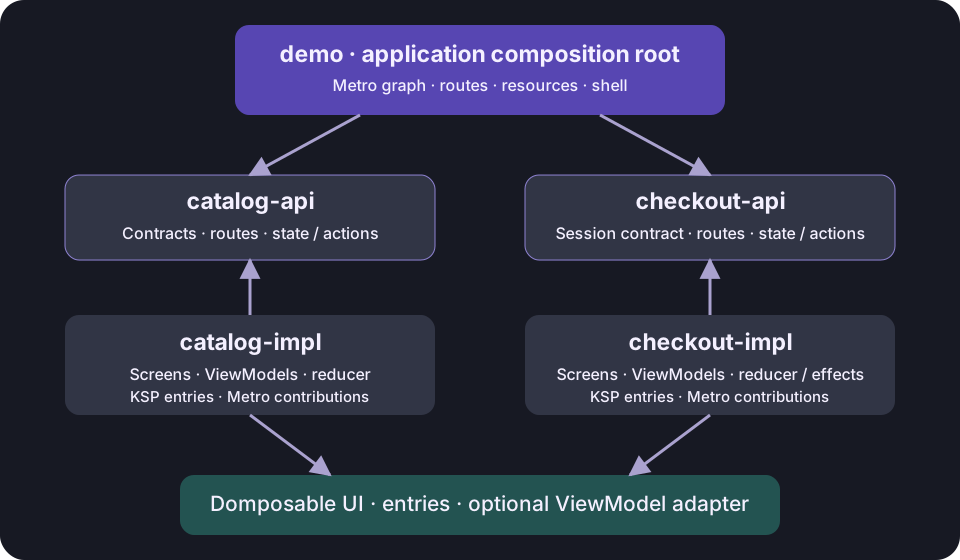
Module responsibilities
| Gradle module | Source directory | Owns |
|---|---|---|
:catalog-api |
feature/catalog/api |
Product contracts, catalog routes, immutable state/actions and the feature entry interface |
:catalog-impl |
feature/catalog/impl |
Catalog repository, reducers, ViewModels, screens, Metro contributions and generated entries |
:checkout-api |
feature/checkout/api |
Cart/checkout routes, state/actions, session contract and feature entry interface |
:checkout-impl |
feature/checkout/impl |
Cart reducer, session implementation, entry ViewModels, checkout effects and screens |
:demo |
demo |
Application graph, theme, artwork, shell, URL codec and navigator |
The API modules depend on the UI, screen and optional navigation contracts. They have no Metro dependency or ViewModel base class. Catalog implementation consumes the checkout API to add products; checkout implementation consumes the catalog API for product data. Implementation modules never depend on each other or on the application.
Gradle uses distinct names such as catalog-api and checkout-api even though their directories end in api. This prevents artifact capability and Kotlin module identity collisions. These are application sample modules; they are not part of Domposable's Maven publication.
1. Screens receive ViewModels
Feature authors declare one screen with an ordinary injected default parameter. There is no separate entry wrapper and no factory or navigator in the screen's parameter list:
@Composable
@DomposableScreen(CatalogRoute.Collection::class, viewModel = true)
fun CollectionScreen(model: CatalogViewModel = metroViewModel()) {
    val navigator = LocalShopNavigator.current
    val artwork = LocalShopArtwork.current
    DomposableMviScreen(model) { state, onAction ->
        StorefrontContent(
            state, onAction, artwork, showHero = false,
            onBrowse = { navigator.navigate(CatalogRoute.Collection) },
            onProduct = { navigator.navigate(CatalogRoute.Product(it)) },
        )
    }
}
The sample uses a small helper to collect its model. Focus on the screen boundary: the injected model belongs to its navigation entry, and content calls shared components. State collection stays an application choice.
The sample defines LocalShopNavigator as a typed composition local in its API module. The app provides it once. This keeps route types checked by Kotlin and lets nested UI navigate without threading a navigator through every function. LocalShopArtwork supplies the app's bundled resource renderer in the same way. These are sample application choices, not mandatory library globals.
2. Each entry owns a model; the flow owns its session
Collection and Discover create separate entry ViewModels. Both read the same graph-scoped cart. Opening Product creates a model with that route's product ID. Recomposition reuses it; Back removes its owner and clears it. Resizing panes keeps the entry identity and its model.
The graph owns repositories and the cart for the whole shopping flow. A reload creates a new in-memory session. Durable orders and process-death restoration belong in application repositories.
3. Metro injects through its standard Compose API
MetroX's metroViewModel() reads one application-wide LocalMetroViewModelFactory; ViewModels contribute to its maps with @ViewModelKey and @ContributesIntoMap. The app graph extends ViewModelGraph. The factory implementation in ShopViewModelFactory.kt is Metro's standard map-based factory, shared by all features.
Product needs the current route's ID, so it uses Metro's manual assisted injection:
@Composable
@DomposableScreen(CatalogRoute.Product::class, viewModel = true)
fun ProductScreen(
    route: CatalogRoute.Product,
    model: ProductViewModel = assistedMetroViewModel<ProductViewModel, ProductViewModel.Factory> {
        create(route.id)
    },
) {
    val navigator = LocalShopNavigator.current
    val artwork = LocalShopArtwork.current
    DomposableMviScreen(model) { state, onAction ->
        ProductContent(
            state, artwork,
            onAdd = { onAction(ProductAction.Add) },
            onBrowse = { navigator.navigate(CatalogRoute.Collection) },
            onCart = { navigator.navigate(CheckoutRoute.Cart) },
        )
    }
}
Its @AssistedFactory extends ManualViewModelAssistedFactory and contributes with @ManualViewModelAssistedFactoryKey. The application never passes this factory to a screen or generated entry list. Metro resolves it through its factory map when a new entry creates a model.
Injection happens inside the entry's ViewModel owner. Recomposition reuses the same model, a covered entry keeps it, and popping the entry clears it. Discover and Collection have separate ViewModels while sharing the graph-scoped cart. Another DI container can use its own Compose injection default, such as koinViewModel(); KSP never reads or copies that expression.
4. KSP removes registration and respects injection defaults
For every annotated screen, KSP supplies the current route and generates an entry factory. The full overload accepts explicit dependencies; a second overload omits default parameters and lets the original composable evaluate them under its entry owner.
For this sample, generated domposableEntries() needs no arguments. Each implementation exposes it through the small feature API:
interface CatalogFeature {
    fun entries(): List<DomposableDestination<*>>
}

@Inject
@ContributesBinding(ShopScope::class)
class DefaultCatalogFeature : CatalogFeature {
    override fun entries() = domposableEntries()
}
Apply the Domposable KSP processor in each implementation module's common metadata. Apply the Metro compiler plugin and add metrox-viewmodel-compose to the implementation and application graph modules. API modules keep DI out of their contracts.
For a JVM desktop application, add kotlinx-coroutines-swing to jvmMain so AndroidX lifecycle collection has a Dispatchers.Main implementation. The demo uses version 1.11.0, aligned with its coroutines core dependency.
The application assembles the features and provides its environment once:
val graph = remember { createShopGraph() }
val navigator = rememberDomposableNavigator<ShopRoute>(CatalogRoute.Home, ShopCodec, browserUrls)
val entries = remember(graph) { graph.catalog.entries() + graph.checkout.entries() }
CompositionLocalProvider(
    LocalMetroViewModelFactory provides graph.metroViewModelFactory,
    LocalShopNavigator provides navigator,
    LocalShopArtwork provides artwork,
) {
    DomposableNavHost(navigator, entries)
}
ShopGraph : ViewModelGraph aggregates the feature bindings, repositories and ViewModel maps. Create one graph per shopping flow. Scope repositories and the cart to it; ViewModels belong to individual entries rather than the graph.
No MVI, DI or navigation strategy is inferred by KSP. Without KSP, declare DomposableDestination or register route types directly. Without the navigator, own the stack. Direct Navigation 3 and manual registry examples show both alternatives.
The graph and cart are an in-memory demo session. Resize and navigation preserve them; a full reload creates a fresh session. Process-death restoration, durable orders and browser persistence are outside this sample. Applications needing them can persist through repositories and restore drafts using the saved-state owner.
Build and verify
./gradlew :catalog-impl:jvmTest :checkout-impl:jvmTest :demo:jvmTest
./gradlew :androidApp:assembleDebug :demo:jsBrowserDevelopmentWebpack :demo:wasmJsBrowserDevelopmentWebpack
./gradlew :demo:linkDebugFrameworkIosSimulatorArm64
CI compiles these modules through every demo target, checks reducer behavior and session independence, and runs the same browser checkout and reviewed platform screenshots. Because KSP-generated factories and aggregated lists are used by feature implementations, compilation also verifies their generated names and route types.
Browse the feature modules · Metro ViewModel Compose · Optional library integrations