Modifiers and app-owned effects
Modifiers are immutable, ordered operations on shared UI. Use the same chain in Android, iOS, desktop, HTML and Wasm feature code. Native Compose and HTML translate each operation at the rendering boundary.
Full modifier signatures and parameters · Live extension example
Supported operations
| Purpose | Shared operations | Behavior |
|---|---|---|
| Insets and size | padding, width, height, size |
Logical dimensions; start/end padding follows layout direction |
| Constraints | minWidth, maxWidth, minHeight, maxHeight, widthIn, heightIn, constrainContentWidth |
Incoming native constraints and browser containing blocks still apply |
| Fill and wrap | fillMaxWidth, fillMaxHeight, fillMaxSize, wrapContentSize, aspectRatio |
A parent must provide finite space for scrolling or fill behavior |
| Drawing | background, shaped background, border, clip, shadow |
Native shapes/elevation or CSS backgrounds, outlines and shadows; shadow pixels differ by renderer |
| Transforms | offset, scale, rotate, alpha, zIndex |
Visual transforms do not reserve new layout space; negative scale mirrors content |
| Child layout | weight, align, boxAlignment |
Use in the corresponding row, column or box scope; invalid native scopes fail explicitly |
| Interaction | clickable |
Enabled state, role and accessible action label; HTML also supports keyboard activation |
| Semantics | contentDescription, testId |
Semantic attributes attach to the control rather than only its layout wrapper; the outermost testId wins when tags are chained |
| Scroll | verticalScroll, horizontalScroll, optional shared scroll state |
Ordered viewport wrappers on HTML; native scroll state on Compose UI |
| Composition | then |
Append another chain or an app-owned element without changing the original modifier |
Shadows do not clip content. Add clip deliberately when you need it, and consider order: clipping after a shadow can preserve the outer shadow while clipping the content. CSS and Compose have different stacking and constraint models; see platform boundaries.
DomposableColumn(
    DomposableModifier
        .widthIn(min = 240.dp, max = 640.dp)
        .padding(horizontal = 16.dp, vertical = 12.dp)
        .shadow(4.dp, DomposableShape.Rounded(12.dp))
        .background(DomposableTheme.colors.surface, DomposableShape.Rounded(12.dp)),
) {
    FeatureContent()
}
Types and .dp live in io.github.samuolis.domposable.foundation; modifier functions live in io.github.samuolis.domposable.ui.
On HTML, weight distributes available space when the parent bounds that axis. In a naturally sized document column, a weighted child keeps its intrinsic content height. Weight does not create a scroll viewport; provide a finite height when the content should scroll within a panel.
zIndex orders the whole component, including backgrounds and decorations earlier in the chain. Use whole-number stacking levels when targeting HTML.
HTML click modifiers activate with Enter on keydown and Space on release; link roles use Enter. Nested buttons, links and other controls own their interactions, so activating a child does not also invoke its clickable parent.
Combine existing modifiers
An ordinary extension works across all renderers without registration:
fun DomposableModifier.contentGutter(inset: DomposableLength): DomposableModifier =
    fillMaxWidth().padding(inset)
Pass typed parameters to your extension. Do not mutate a reused chain or rewrite its existing elements. Use component appearance parameters for component-specific colors, typography or decoration defaults.
Add a custom modifier without changing Domposable
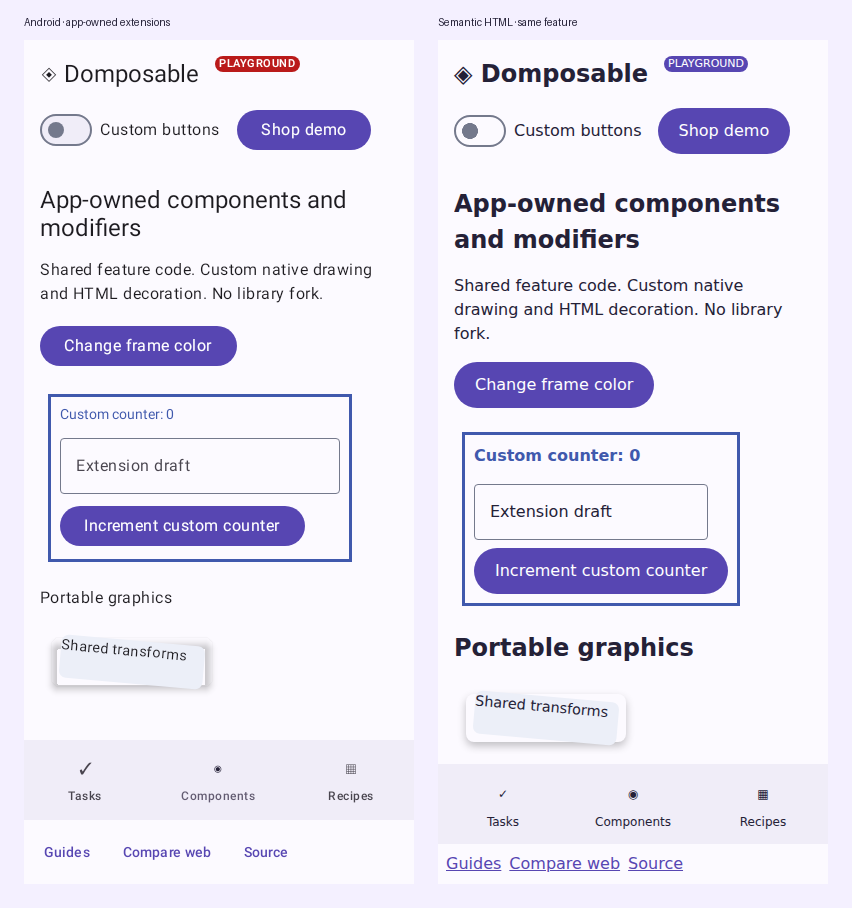
The runnable example defines its own element in commonMain:
@Immutable
data class AppAccentFrame(val color: DomposableColor) : DomposableModifierElement

fun DomposableModifier.appAccentFrame(color: DomposableColor): DomposableModifier =
    then(AppAccentFrame(color))
Place it between built-in operations as needed:
DomposableColumn(
    DomposableModifier
        .padding(8.dp)
        .appAccentFrame(accent)
        .padding(12.dp),
) {
    AppCounterContent()
}
The native implementation returns a Compose modifier. It can use drawBehind, drawWithContent, a custom modifier node or another Compose modifier API. For example:
val parent = LocalDomposableNativeModifierRenderer.current
val renderer = remember(parent) {
    { element: DomposableModifierElement ->
        when (element) {
            is AppAccentFrame -> Modifier.drawBehind {
                val stroke = 3.dp.toPx()
                drawRect(Color(element.color.argb), style = Stroke(stroke))
            }
            else -> parent?.invoke(element)
        }
    }
}
CompositionLocalProvider(LocalDomposableNativeModifierRenderer provides renderer) {
    FeatureContent()
}
This code belongs in the app's native renderer source set, with Compose UI imports. Native dp is androidx.compose.ui.unit.dp; shared feature dimensions use foundation.dp. The complete compiled native example also insets the stroke and provides a platform-owned custom label.
Set HTML attributes in jsMain
When writing a web adapter or an app-owned HTML component, use htmlAttributes for CSS, classes and attributes on the component's semantic element:
// jsMain only; import io.github.samuolis.domposable.ui.htmlAttributes
DomposableText(
    text = message,
    modifier = DomposableModifier.htmlAttributes {
        classes("app-message")
        attr("data-message-kind", "notice")
        style {
            property("white-space", "pre-line")
            property("overflow-wrap", "anywhere")
        }
    },
)
This does not add a layout wrapper. It runs where the renderer attaches testId and contentDescription; it does not select or rewrite private descendants. Custom HTML renderers must call domposableAttributes(modifier) on their semantic element to support it. Prefer appearance parameters for shared colors, typography and geometry: a renderer can apply its own attributes/styles after this callback. Preserve accessible labels and native control behavior when adding attributes or events.
htmlAttributes is available only to Kotlin/JS HTML code. Keep it inside jsMain adapters; use a typed app-owned modifier with native and HTML implementations when the feature itself needs a portable extension.
Wrap arbitrary HTML content
A custom container can delegate its complete modifier chain, including ordered semantic wrappers, to the shared HTML engine:
@Composable
fun AppFrame(
    modifier: DomposableModifier = DomposableModifier,
    content: @Composable () -> Unit,
) {
    DomposableHtmlModifiers(modifier, wrapSemantics = true) {
        content()
    }
}
Use this Kotlin/JS overload for adapters around arbitrary content. It renders testId, contentDescription and htmlAttributes on wrapper nodes at their position in the chain, alongside shared sizing, scrolling and interaction behavior. App-owned modifier elements still use the existing renderer or decoration hooks; there is no need to copy the portable operation renderer.
For a component with its own semantic control, keep the default overload and call domposableAttributes(modifier) on that control. This keeps labels and test IDs on the actual button, input or link. Do not apply those attributes again inside wrapSemantics = true, which already emits their wrappers. These are HTML renderer choices; shared feature code and native modifiers do not change.
Render custom HTML and CSS
The HTML decoration hook returns a composable wrapper for elements it recognizes, or null to fall back to another handler. It can compose HTML, an SVG or canvas host, overlays and the remaining content. It does not require a library release for new CSS.
val parent = LocalDomposableHtmlModifierDecorationRenderer.current
val renderer: DomposableHtmlModifierDecorationRenderer = remember(parent) {
    { element ->
        if (element is AppAccentFrame) {
            val decoration: DomposableHtmlModifierDecoration = { content ->
                Div(attrs = { style { property("position", "relative") } }) {
                    Div(attrs = {
                        attr("aria-hidden", "true")
                        style {
                            property("position", "absolute")
                            property("inset", "0")
                            property("border", "3px solid ${element.color.css()}")
                            property("pointer-events", "none")
                        }
                    })
                    content()
                }
            }
            decoration
        } else {
            parent?.invoke(element)
        }
    }
}
CompositionLocalProvider(LocalDomposableHtmlModifierDecorationRenderer provides renderer) {
    FeatureContent()
}
This code belongs in jsMain, using Compose runtime, Compose HTML and the ui HTML adapter imports. The compiled HTML example includes all imports, attribute-handler fallback and a custom HTML component.
For attributes or CSS on an ordinary wrapper, keep using LocalDomposableHtmlModifierRenderer. A matching decoration takes precedence; returning null falls back to the attribute handler. A custom renderer can instead pass decorationRenderer or operationRenderer directly to DomposableHtmlModifiers. An explicit handler takes precedence over the corresponding composition local. Capture and delegate to parent handlers when installing nested extensions.
For a CSS-only implementation, the attribute handler is enough. This alternative renders the same app-owned AppAccentFrame(color) as an outline on its wrapper:
val parent = LocalDomposableHtmlModifierRenderer.current
val cssRenderer: DomposableHtmlModifierElementRenderer = { element ->
    if (element is AppAccentFrame) {
        val attributes: AttrsScope<HTMLElement>.() -> Unit = {
            style {
                property("outline", "3px solid ${element.color.css()}")
                property("outline-offset", "-3px")
            }
        }
        attributes
    } else {
        parent?.invoke(element)
    }
}
CompositionLocalProvider(LocalDomposableHtmlModifierRenderer provides cssRenderer) {
    FeatureContent()
}
Use this instead of installing a decoration handler for the same element. AttrsScope also exposes classes, attributes and events for app-owned wrappers. These hooks style the modifier's wrapper; they do not mutate private child controls. Use the component's appearance parameters for built-in control styling, or supply an app-owned component renderer when its HTML structure needs to change. HTML-only CSS belongs in jsMain; shared feature code passes typed intent and values.
A decoration must render its content once, preserve its state and semantics, and avoid covering interactive content. Mark purely decorative markup aria-hidden and disable its pointer events. Your renderer owns sizing, positioning, disposal of external resources and accessibility. Unhandled custom elements fail explicitly rather than silently disappearing. Built-in operations keep their library implementations; use a custom element for app behavior.
To forward an allocated height through your decoration, give its root display: grid and grid-template: minmax(0, 1fr) / minmax(0, 1fr), with overlays positioned absolutely. The child then stretches into the available area. An ordinary block wrapper keeps its children at intrinsic height; use that when your component intentionally owns its sizing. Built-in height modifiers propagate constraints through subsequent built-in wrappers, while wrapContentSize restores intrinsic content sizing inside its aligned slot. A vertical scroll modifier bounds the viewport and keeps its content at intrinsic height so its start and end remain reachable.
Drawing and advanced platform APIs
There is no shared Compose DrawScope that automatically translates arbitrary Kotlin canvas code into HTML. Choose a shared intent, such as .appAccentFrame(color), then implement its native drawing and HTML/CSS/SVG equivalent in the app. Feature code remains common.
| Need | Extension path |
|---|---|
| Extra CSS, gradients, custom filters or decorative markup | App-owned HTML attribute or decoration handler |
Native drawBehind, custom gesture/focus behavior or advanced graphics |
Return the native Compose modifier from the app's native handler |
| Shared control with a different element tree, custom input, editor or chart | App-owned component, with platform renderers when needed |
| A native-only operation during migration | Modifier.asDomposableModifier() or native DomposableModifier.then(Modifier) inside a native boundary |
| Portable behavior useful across many apps | A library contribution with native/HTML implementations and documented differences |
Advanced focus, pointer gestures, nested scrolling, 3D graphics and platform inset policies are not automatically made portable by this extension API. Implement equivalent behavior in each supported renderer or keep it inside a platform-specific component. Never insert native Compose UI nodes into an HTML composition.
The shared example runs in the demo's Custom components and modifiers page. Tests exercise state retention, ordered padding, pointer interaction, HTML accessibility, native drawing and cross-platform screenshot captures.
Image overlays and proportional panes
Paint a scrim with background(DomposableLinearGradient(...)) and layer it in DomposableBox; Box children overlap on native and HTML. Gradient stops use positions from zero to one and must be ordered. Repeated positions create a hard color transition.
Use pointerPassthrough() for a decorative scrim or a full-size content overlay. Native noninteractive layout already passes unhandled pointer input through. HTML makes the wrapper transparent to pointer input and restores it for descendant links, buttons, inputs, selects, textareas, button/link roles and focusable tabindex elements. A custom HTML click target must expose its interactive role or tabindex. Keyboard focus and semantics are preserved; this modifier does not disable controls.
fillMaxWidth(fraction, min, max) takes a fraction of the original available width, then clamps it to the supplied bounds and parent constraints. This matches CSS percentage-plus-min/max sizing; it is different from constraining a native parent's width before applying a fraction. border(width, color, edge) supports logical Start/End edges as well as Top/Bottom, including RTL layouts.
region(label) exposes a labelled section/traversal group. DomposableVisibility(false) keeps the content composed while excluding it from layout and accessibility. Use it when an adaptive layout should retain a pane's draft rather than recreating it after resizing. Prefer an ordinary if when the hidden content should be disposed.
See the CSS-free card and pane example.
Viewport bounds without CSS
Use viewport bounds for document shells and scrollable modal bodies. fillMaxHeight() fills the
parent's available height; these operations deliberately measure the host window instead:
import io.github.samuolis.domposable.foundation.dp
import io.github.samuolis.domposable.ui.DomposableColumn
import io.github.samuolis.domposable.ui.DomposableModifier
import io.github.samuolis.domposable.ui.DomposableViewportUnit
import io.github.samuolis.domposable.ui.maxViewportHeight
import io.github.samuolis.domposable.ui.minViewportHeight
import io.github.samuolis.domposable.ui.verticalScroll

DomposableColumn(
    modifier = DomposableModifier.minViewportHeight(
        subtract = 64.dp,
        unit = DomposableViewportUnit.Small,
    ),
) { DocumentContent() }

DomposableColumn(
    modifier = DomposableModifier.maxViewportHeight(subtract = 80.dp).verticalScroll(),
) { ModalBody() }
viewportHeight requests a fixed height, minViewportHeight lets longer documents grow, and
maxViewportHeight leaves shorter content at its natural height. All accept a fraction from more
than zero through one and a nonnegative subtract value for app-owned chrome; results clamp at
zero and native parent constraints still apply. These operations do not add safe-area padding.
HTML uses small viewport units for Small and dynamic viewport units for Dynamic, with ordinary
viewport units as a fallback. Small viewport height avoids resizing document shells when browser
bars move. Native Compose uses the current host window size for both choices, because browser-bar
states do not exist there. Keep a single scroll owner and use the scaffold's measured available
content size when a parent region, rather than the whole window, owns the height.