Shared components
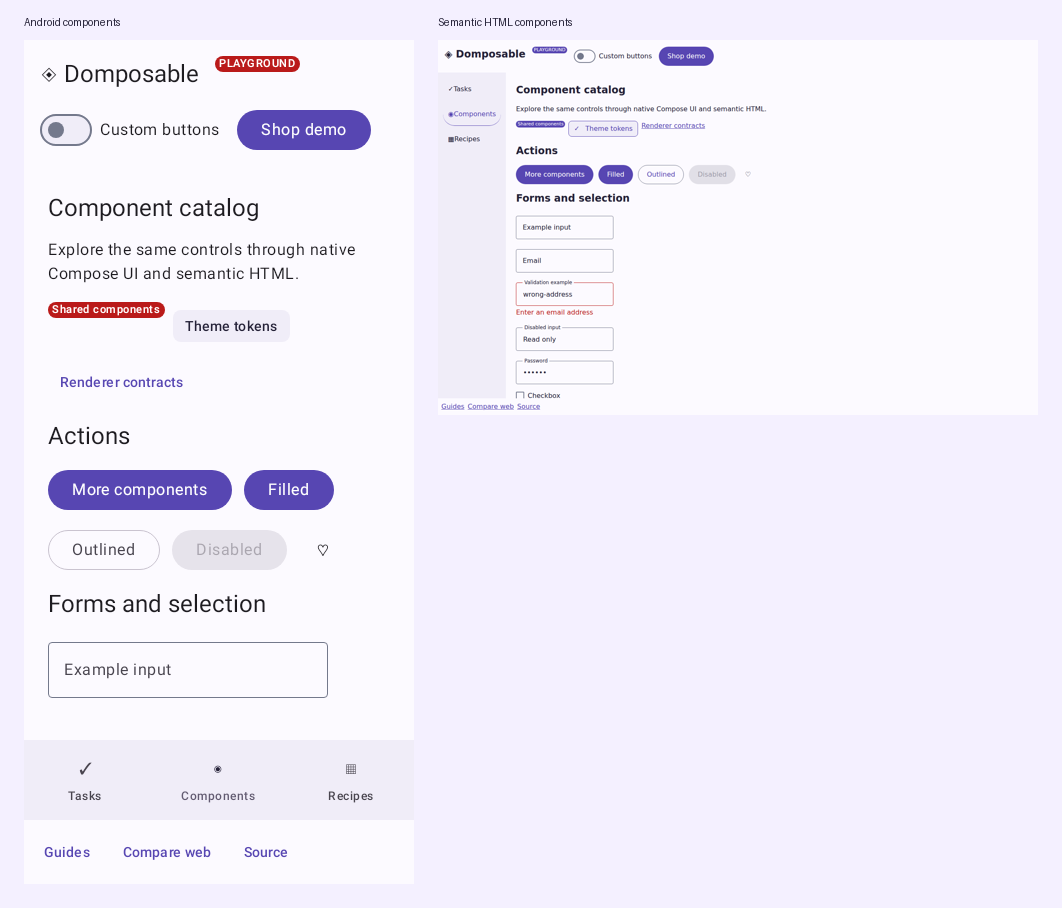
Use direct composable calls in shared feature code and install a provider at the app root. The shared API has typed renderer contracts with Compose UI and semantic HTML implementations; Wasm uses the Compose UI provider. How the API works explains the call path and the catalog exercises the controls.
The Material 3 and expressive catalog maps component families to their shared APIs and shows theme, appearance and screen-scaffold configuration.
Forms and selection
@Composable
fun NewsletterForm(onSubscribe: (String) -> Unit) {
    var email by remember { mutableStateOf("") }
    var consent by remember { mutableStateOf(false) }
    DomposableColumn(DomposableModifier.padding(16.dp), gap = 12.dp) {
        DomposableText("Stay in the loop", style = DomposableTextStyle.Title)
        DomposableTextField(email, { email = it }, "Email address", purpose = DomposableInputPurpose.Email)
        DomposableCheckbox(consent, { consent = it }, "Send me occasional news")
        DomposableButton("Subscribe", { onSubscribe(email) }, enabled = consent && email.isNotBlank())
    }
}
The app owns validation and submission. Pass an error message to TextField or Select to display it and associate it with the control. HTML uses labelled browser inputs; native uses Material controls.
DomposableSelect(
    value = delivery,
    onValueChange = { delivery = it },
    label = "Delivery",
    options = listOf(
        DomposableSelectOption("standard", "Standard"),
        DomposableSelectOption("express", "Express"),
        DomposableSelectOption("same-day", "Same day", enabled = false),
    ),
)
DomposableSegmentedButtons(
    labels = listOf("Home", "Office"),
    selectedIndex = addressIndex,
    onSelect = { addressIndex = it },
    label = "Delivery address",
)
DomposableRangeSlider(
    value = priceRange,
    onValueChange = { priceRange = it },
    startLabel = "Minimum price",
    endLabel = "Maximum price",
    range = 0f..100f,
    steps = 9,
)
Select values must be unique and include the current value. Use an explicit placeholder option when no choice has been made. Native presents a Material dropdown; HTML emits a <select> with disabled options and preserves the app's controlled value. SegmentedButtons provides one selected choice with native selection semantics or an HTML radio group. A range has ordered, finite endpoints inside its bounds; steps = 9 divides 0–100 into ten intervals. HTML displays two labelled browser sliders; native uses Material's two-thumb slider. Both thumbs remain independently accessible.
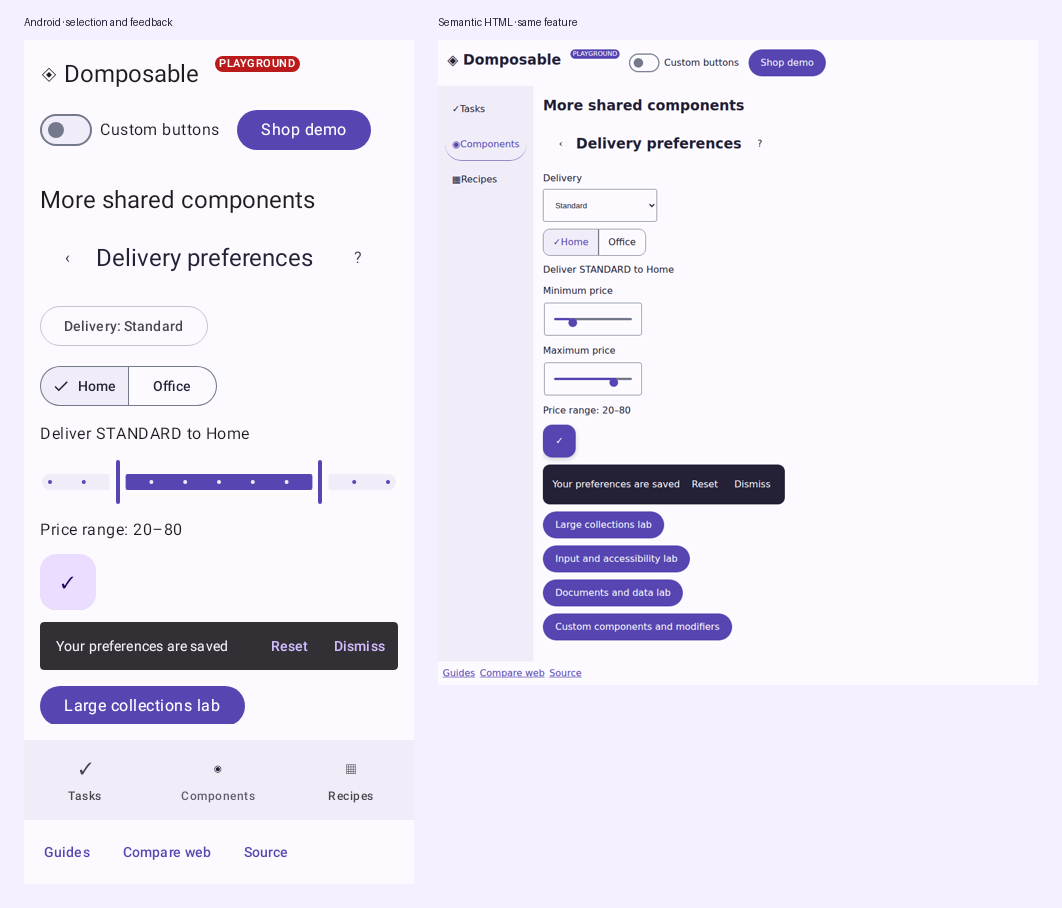
Both previews run ExtendedComponentCatalog() from commonMain. The provider changes the controls' structure; the selected delivery, address, price range and callbacks come from the same feature. The HTML/Wasm comparison lets you change the actual viewport width.
Layout arrangements
Rows and columns keep their current start placement by default. Set arrangement to place children along the main axis. gap is used by Start, Center and End; the SpaceBetween, SpaceAround and SpaceEvenly arrangements distribute the available space between children:
DomposableRow(
    modifier = DomposableModifier.fillMaxWidth(),
    gap = 12.dp,
    arrangement = DomposableArrangement.SpaceBetween,
) {
    DomposableText("Order 1042")
    DomposableText("€38.00")
}

DomposableColumn(
    modifier = DomposableModifier.height(240.dp),
    gap = 8.dp,
    arrangement = DomposableArrangement.End,
) {
    DomposableText("Optional details")
    DomposableText("Placed at 14:30")
}
DomposableFlowRow also accepts a main-axis arrangement, alignment for items within each line, and rowGap between lines. Its rowGap defaults to gap. Items align to the top by default on both renderers; HTML no longer stretches shorter items to the line height. Use these shared values instead of adding provider-specific layout CSS to feature code.
Actions and help
DomposableButton("Apply", onApply, style = DomposableButtonStyle.Outlined)
DomposableChip("Favorites", onToggleFavorites, selected = favoritesOnly)
DomposableIconButton(onFavorite, label = "Favorite") { DomposableIcon("♡", description = null) }
DomposableTooltip("Saves this item to your favorites") {
    DomposableIconButton(onFavorite, label = "Favorite") { DomposableIcon("♡", description = null) }
}
DomposableLink("Help", "https://example.com/help")
Chip labels support the same text limits on native and HTML. Give the chip a bounded width when you want long labels to truncate:
DomposableChip(
    "A long category name",
    onClick = onSelectCategory,
    modifier = DomposableModifier.width(160.dp),
    appearance = DomposableItemAppearance(
        textAppearance = DomposableTextAppearance(
            maxLines = 1,
            overflow = DomposableTextOverflow.Ellipsis,
        ),
    ),
)
Text limits apply to the label, preserving the control's touch target. Use
selectedTextAppearance for a different selected label style; item content
colors also configure its icons.
Filter and Input chips expose selection to accessibility services. Assist and
Suggestion chips are actions, including when used to open a popup; they do not
become toggle buttons because their appearance changes. Input chip padding
adapts to its leading and trailing icon slots. An explicit contentPadding
overrides those defaults.
Tooltips provide supplemental descriptions. The control still needs its own accessible label. HTML shows help on hover or keyboard focus and supports Escape; native delegates hover/long-press behavior to Material. Link emits a browser anchor or opens the native URI handler. Navigation items with href preserve browser new-tab behavior while ordinary clicks call onSelect.
Use description = null for a decorative Icon inside a labelled control. IconButton and FloatingActionButton take the control's accessible label; the decorative glyph does not become part of that name.
For custom filled vector artwork, pass SVG path data rather than encoding it as a text glyph. The vector inherits the current content color, uses a 24-unit viewport by default, and follows the supplied modifier size on both renderers:
DomposableIcon(
    vector = DomposableVectorIcon(
        pathData = "M12 2 3 21h18L12 2z",
    ),
    description = "Warning",
    modifier = DomposableModifier.size(24.dp),
)
Set evenOdd = true for paths that use the even-odd fill rule, and provide a description for standalone meaningful icons. Decorative icons should use description = null.
Content and collections
Text layout can be configured without renderer-specific CSS:
DomposableText(
    summary,
    appearance = DomposableTextAppearance(
        minLines = 2,
        maxLines = 3,
        overflow = DomposableTextOverflow.Clip,
        selectable = true,
    ),
)
Clip hides content beyond maxLines; Ellipsis truncates it with an ellipsis.
The HTML renderer uses the text's rendered line height, including theme and custom
typography overrides. minLines reserves space; it does not add text. The app
controls selection with selectable on both renderers.
DomposableCard(onClick = onOpenProduct) {
    DomposableColumn(gap = 8.dp) {
        DomposableImage(product.imageUrl, description = product.name)
        DomposableText(product.name, style = DomposableTextStyle.Title)
        DomposableBadge("New")
    }
}
DomposableLazyGrid(
    items = products,
    key = { it.id },
    modifier = DomposableModifier.fillMaxWidth().height(480.dp),
    columns = columnsForContentWidth,
    gap = 16.dp,
) { product -> ProductCard(product) }
ProductCard belongs to the feature. Keys must be stable and unique. Compose UI collections virtualize; HTML normally emits all keyed items as lists/CSS grid. For large datasets, use optional column, row, grid and table windows. Keep a bounded height when nesting a native lazy collection inside another scroll container. The storefront uses wrapping rows for its small catalogue.
Shell and feedback
DomposableScaffold(
    topBar = {
        DomposableTopAppBar("My shop", actions = {
            DomposableIconButton(onOpenBag, "Open bag") { DomposableIcon("▣", null) }
        })
    },
    bottomBar = { DomposableLink("Help", "https://example.com/help") },
    floatingAction = {
        DomposableFloatingActionButton(onAdd, "Add item") { DomposableIcon("+", null) }
    },
    snackbar = {
        notice?.let { message ->
            DomposableSnackbar(message, actionLabel = "Undo", onAction = onUndo, onDismiss = onDismissNotice)
        }
    },
) {
    ProductsScreen(model)
}
Scaffold owns the full-window shell with header/main/footer landmarks on HTML. Use DomposableScreenScaffold for screen chrome inside an application shell. The direct DomposableSnackbar call is controlled by the app, as shown above. For serialized requests, timeouts and action results, use the optional DomposableSnackbarHostState and DomposableSnackbarHost. Supply both actionLabel and onAction when offering a direct snackbar action. Use Banner for inline status and Progress for determinate or indeterminate work.
if (confirming) {
    DomposableDialog(
        title = "Remove item?",
        onDismiss = { confirming = false },
        layout = DomposableModalLayout(
            maxWidth = 480.dp,
            maxViewportFraction = 0.9f,
            sectionSpacing = 12.dp,
        ),
        actions = {
            DomposableButton("Remove", { confirming = false; onRemove() })
        },
    ) {
        DomposableText("This removes the item from your list.")
    }
}
The feature owns dismissal and application effects. HTML uses a modal dialog with focus restoration; native uses Material's dialog. BottomSheet follows the same controlled presentation pattern.
Dialog and bottom-sheet layout options bound the surface itself on both renderers. HTML alignment adapts placement to the browser viewport; native dialogs and sheets retain their platform placement. padding configures Basic/FullScreen dialog and sheet content; native Material alert and picker variants retain Material content spacing. Set maxWidth, fillViewportWidth, padding, heightFraction, maxHeight, maxViewportFraction, viewportInset, or alignment to match the host layout. Bottom-sheet swipe dismissal is enabled by default and can be disabled with swipeToDismiss = false. On HTML, modal backdrops only dismiss when a pointer starts and ends outside the dialog; older browsers use a focus-contained fallback overlay. Supply headerContent when the app needs a localized close label or custom header; that slot owns the accessible title and dismiss control.
sectionSpacing sets the gap between HTML modal sections, including a sheet drag handle, header, body, and close action. HTML keeps its 16 dp default when this value is null. Native Basic/FullScreen dialogs and sheet content apply the value between their arranged sections; native sheets keep Material's drag-handle spacing, and native alert and picker variants retain Material's built-in section spacing.
Complete vocabulary
The complete parameter reference lists every current renderer contract with types, required parameters and defaults. See custom components and modifier extensions for app-owned UI.
| Family | Components |
|---|---|
| Theme | Theme |
| Layout | Column, Row, FlowRow, Box, LazyColumn, LazyRow, LazyGrid, Spacer, Divider, Scaffold |
| Data | Table, DataTable with row/cell actions, LineChart, ValueChart |
| Actions | Button, IconButton, FloatingActionButton, Link, Chip, Tooltip |
| Forms | Form, TextField, Checkbox, Switch, RadioButton, Slider, RangeSlider, Select, SegmentedButtons |
| Content | Text, RichHtml, Disclosure, Image, Icon, Card, Surface, Avatar, Badge |
| Feedback | Banner, Progress, Snackbar, Menu, Dialog, BottomSheet |
| Navigation | TopAppBar, Tabs, NavigationBar |
Every component has direct arguments and a Props overload. Keep props for renderer customization or reusable configuration; ordinary feature code can use the calls above. See design-system customization, adaptive examples and platform boundaries.
The demos share the same feature code for native Compose, HTML and Wasm. The generated reference and API site describe the current source; choose a published version from Releases and consult the migration guide when upgrading.
Documents, rich inputs and data
ProductComponentLab
is a complete shared feature. Run /demo/#/product-components in HTML or
/wasm/#/product-components after building this branch.
DomposableForm(onSubmit = onSave, label = "Delivery preferences") {
    DomposableTextField(
        email, onEmailChange, "Contact email",
        purpose = DomposableInputPurpose.Email,
        placeholder = "you@example.com",
        helperText = "We only use this for delivery updates",
        imeAction = DomposableImeAction.Done,
    )
    val submit = rememberDomposableFormSubmit()
    DomposableButton("Save", submit)
}
DomposableSegmentedButtons(
    options = listOf(
        DomposableChoiceOption("standard", "Standard"),
        DomposableChoiceOption("express", "Express"),
        DomposableChoiceOption("same-day", "Same day", enabled = false),
    ),
    selectedValue = delivery,
    onSelectionChange = onDeliveryChange,
    label = "Delivery speed",
)
DomposableDisclosure("Shipping details", expanded, onToggle) {
    DomposableRichHtml(descriptionHtml, selectable = true, onLinkClick = onOpenLink)
}
Form emits a real browser form and supports native Done/Go/Search/Send actions. The submit helper
always calls the current callback and respects the enclosing form's enabled state. Keep browser
validation enabled for HTML constraint validation; the application still owns domain validation.
TextField adds readonly, password visibility, autocomplete, line limits, helper/error text,
autofocus, explicit IME actions and leading/prefix/trailing slots. HTML multiline fields retain
the browser's two-row initial size by default; minLines and maxLines bound that initial size
and the maximum control height. Set both to 1 when a one-row textarea is needed. Typed segmented choices keep
selection attached to values when options are reordered or labels are translated.
RichHtml parses a fixed markup allowlist on every target. It removes active content and unsafe link schemes rather than inserting raw HTML. Native renders annotated text; HTML creates semantic nodes. Use an application renderer when you need an editor or a full document engine.
val orders = listOf(DomposableChartSeries(
    key = "orders", label = "Orders",
    values = listOf(DomposableChartValue("Mon", 12f), DomposableChartValue("Tue", 18f)),
))
DomposableLineChart(orders, title = "Orders this week", onSelectedIndexChange = onPointSelected)
DomposableValueChart("Order totals", "Sample data", "Daily values", orders, { it.toInt().toString() })
DomposableDataTable(
    columns = listOf(DomposableDataTableColumn("order", "Order")),
    rows = listOf(DomposableDataTableRow("A-101")),
    rowHeaderColumnKey = "order",
    onRowActivate = onOpenOrder,
) { row, _ -> DomposableText(row.key) }
Chart series and table rows use unique stable keys. Explicit chart axis indexes represent sparse data; a series uses either all explicit or all implicit indexes. The caller supplies localized labels and formatters. HTML draws the line chart as SVG and the data table as a semantic table; native draws the chart with Canvas and supplies collection semantics. Pointer, touch and keyboard selection call the same feature callbacks. Cell actions take precedence over row activation.
Overlay alignment without CSS
DomposableBox overlays its children on both renderers. alignment controls horizontal placement;
verticalAlignment independently controls vertical placement and defaults to alignment for existing calls.
For a bottom-centred overlay:
DomposableBox(
    modifier = DomposableModifier.fillMaxSize().pointerPassthrough(),
    alignment = DomposableAlignment.Center,
    verticalAlignment = DomposableAlignment.End,
) {
    DomposableButton("Save", onClick = onSave)
}
pointerPassthrough() allows clicks through the empty overlay while interactive descendants remain usable.
Use boxAlignment(horizontal, vertical) on an individual child's modifier when children need different placements.
These APIs replace application grid-area, child alignment and pointer-event CSS.
Control interaction styles
Set shared interaction values through the theme rather than maintaining separate HTML selectors.
Named font weights remain available; variable fonts can also use an exact weight such as
DomposableFontWeight(750) on either renderer.
val defaults = LocalDomposableTokens.current.components
DomposableMaterialTheme(
    styles = defaults.copy(
        iconButton = defaults.iconButton.copy(
            disabledOpacity = 0.38f,
            interaction = DomposableInteractionAppearance(
                stateLayerOpacity = DomposableStateLayerOpacity(
                    hovered = 0.09f,
                    pressed = 0.16f,
                    focused = 0f,
                ),
                focusRingColor = brandPrimary,
                focusRingWidth = 3.dp,
                focusRingOffset = 0.dp,
            ),
        ),
    ),
) {
    DomposableIconButton(onClick = onClose, label = "Close") { CloseIcon() }
}
interaction = null retains the renderer's Material defaults. A custom interaction owns feedback:
its optional hovered/pressed container and content colors override the base appearance. An explicit
state container replaces that state's content-color layer. stateLayerOpacity configures those
layers when a state container is not supplied. Custom feedback replaces the default ripple or
brightness treatment, so the two effects do not stack. Disabled controls do not react to hover or
press; disabledOpacity affects the whole control. A loading button keeps its enabled colors and
opacity while preventing another click.
Focus width and offset are logical lengths on native and pixels on HTML. HTML retains a system
focus outline in forced-colors mode and suppresses motion when reduced motion is requested.
Button-styled links accept the same DomposableButtonAppearance; HTML retains an actual anchor,
including modified-click behavior. Use buttonStyle = DomposableButtonStyle.Outlined to retain
outlined-button defaults and feedback rather than implementing another hover rule.
Inline text without HTML or CSS
Styled runs remain one wrapping text value on native and HTML. The surrounding typography role
supplies the font family, size and line height; each run overrides only its own emphasis or color.
Text is rendered literally, so a run containing <strong> does not insert markup.
DomposableText(
    runs = listOf(
        DomposableTextRun("Registration closes "),
        DomposableTextRun("tomorrow", fontWeight = DomposableFontWeight.SemiBold),
    ),
    appearance = DomposableTextAppearance(role = DomposableTypographyRole.BodyMedium),
)
Use DomposableRichHtml for already-authored formatted documents, rather than generating HTML
strings for ordinary UI labels.