Material 3 and expressive catalog
Domposable targets Material 3 component families through shared Compose calls. Native targets use Compose Multiplatform Material 3. Kotlin/JS renders semantic HTML. The standard and expressive themes share the same feature API.
The inventory below maps the pinned org.jetbrains.compose.material3:material3:1.12.0-alpha03 source artifact to shared Domposable components. See platform coverage for renderer boundaries and compatibility for tested versions.
The supported baseline uses stable Compose Multiplatform core. Material 3 has a separate version and opt-in API surface; an expressive component does not require upgrading the core to alpha.
Layout helpers, forms, disclosures, rich text, tables and charts are additional Domposable APIs. They are not upstream Material components. Android-specific system integrations and internal Material implementation utilities are outside the component catalog.
Compare themes and states
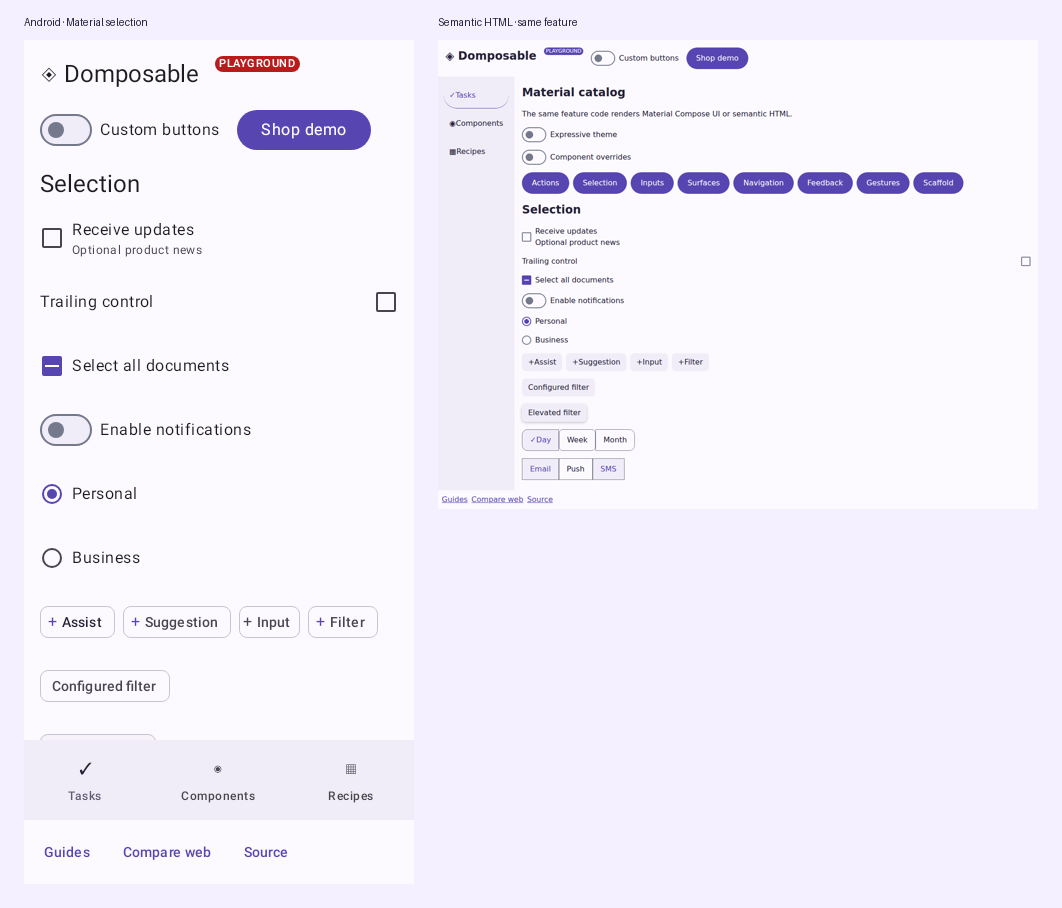
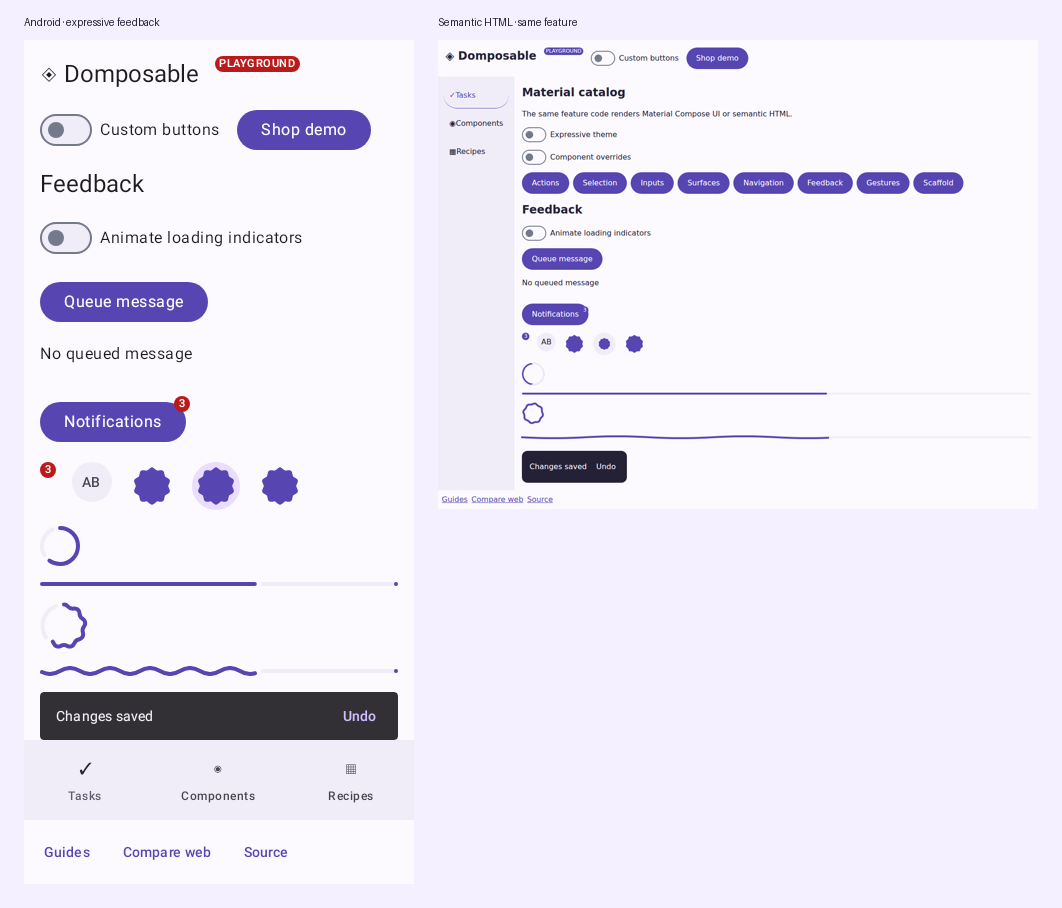
Use the HTML / Compose UI comparison to place the same shared component calls beside each other. Choose Material · states for checked, unchecked, mixed, disabled, slider endpoints and range handles. The other Material scenes cover each component family. Both frames receive the same explicit light, dark, brand, component-override or expressive theme and viewport.
Material geometry, colors and state styling belong in the renderer; an app should not need CSS to repair a default checkbox or slider. CI also captures hover, press and keyboard focus, publishes direct difference panels, and keeps ordinary visual regression checks. The measured report identifies remaining differences rather than treating two independently passing screenshots as proof of a match. Font rasterization and platform input behavior can still vary.
Component inventory
| Family | Shared API | Material variants in scope |
|---|---|---|
| Actions | DomposableButton |
Button, ElevatedButton, FilledTonalButton, OutlinedButton, TextButton |
| Actions | DomposableIconButton |
IconButton, FilledIconButton, FilledTonalIconButton, OutlinedIconButton, IconToggleButton, FilledIconToggleButton, FilledTonalIconToggleButton, OutlinedIconToggleButton |
| Expressive actions | DomposableToggleButton |
ToggleButton, ElevatedToggleButton, TonalToggleButton, OutlinedToggleButton |
| Expressive actions | DomposableButtonGroup |
ButtonGroup |
| Expressive actions | DomposableSplitButton |
SplitButtonLayout |
| Actions | DomposableFloatingActionButton |
FloatingActionButton, SmallFloatingActionButton, MediumFloatingActionButton, LargeFloatingActionButton, ExtendedFloatingActionButton, SmallExtendedFloatingActionButton, MediumExtendedFloatingActionButton, LargeExtendedFloatingActionButton |
| Expressive actions | DomposableFloatingActionButtonMenu |
FloatingActionButtonMenu, FloatingActionButtonMenuItem, ToggleFloatingActionButton |
| Expressive actions | DomposableFloatingToolbar |
HorizontalFloatingToolbar, VerticalFloatingToolbar |
| Selection | DomposableChip |
AssistChip, ElevatedAssistChip, SuggestionChip, ElevatedSuggestionChip, InputChip, FilterChip, ElevatedFilterChip |
| Selection | DomposableCheckbox |
Checkbox, TriStateCheckbox |
| Selection | DomposableSwitch |
Switch |
| Selection | DomposableRadioButton |
RadioButton |
| Selection | DomposableSlider |
Slider, VerticalSlider |
| Selection | DomposableRangeSlider |
RangeSlider |
| Selection | DomposableSegmentedButtons |
SingleChoiceSegmentedButtonRow, SegmentedButton |
| Input | DomposableTextField |
TextField, OutlinedTextField, SecureTextField, OutlinedSecureTextField |
| Input | DomposableSearchBar |
SearchBar, DockedSearchBar, ExpandedFullScreenSearchBar, ExpandedDockedSearchBar, AppBarWithSearch, TopSearchBar, ExpandedFullScreenContainedSearchBar, ExpandedDockedSearchBarWithGap |
| Input | DomposableAutocomplete |
ExposedDropdownMenuBox, ExposedDropdownMenu |
| Input | DomposableDatePicker |
DatePicker, DatePickerDialog |
| Input | DomposableDateRangePicker |
DateRangePicker |
| Input | DomposableTimePicker |
TimePicker, TimeInput, TimePickerDialog |
| Containment | DomposableCard |
Card, ElevatedCard, OutlinedCard |
| Containment | DomposableSurface |
Surface |
| Containment | DomposableListItem |
ListItem, SegmentedListItem |
| Containment | DomposableCarousel |
HorizontalMultiBrowseCarousel, HorizontalUncontainedCarousel, HorizontalCenteredHeroCarousel |
| Communication | DomposableBadge / DomposableBadgedBox |
Badge, BadgedBox |
| Communication | DomposableProgress |
CircularProgressIndicator, LinearProgressIndicator, CircularWavyProgressIndicator, LinearWavyProgressIndicator |
| Expressive communication | DomposableLoadingIndicator |
LoadingIndicator, ContainedLoadingIndicator |
| Communication | DomposableSnackbar / DomposableSnackbarHost |
Snackbar, SnackbarHost |
| Communication | DomposableTooltip |
PlainTooltip, RichTooltip, TooltipBox |
| Containment | DomposableDivider |
HorizontalDivider, VerticalDivider |
| Containment | DomposableDialog |
AlertDialog, BasicAlertDialog |
| Containment | DomposableBottomSheet |
ModalBottomSheet, BottomSheet |
| Containment | DomposableBottomSheetScaffold |
BottomSheetScaffold |
| Navigation | DomposableTopAppBar |
TopAppBar, CenterAlignedTopAppBar, MediumTopAppBar, LargeTopAppBar, MediumFlexibleTopAppBar, LargeFlexibleTopAppBar, TwoRowsTopAppBar |
| Navigation | DomposableBottomAppBar |
BottomAppBar, FlexibleBottomAppBar |
| Navigation | DomposableNavigationBar |
NavigationBar, NavigationBarItem, NavigationRail, NavigationRailItem, ShortNavigationBar, ShortNavigationBarItem |
| Expressive navigation | DomposableWideNavigationRail |
WideNavigationRail, ModalWideNavigationRail |
| Navigation | DomposableNavigationDrawer |
ModalNavigationDrawer, DismissibleNavigationDrawer, PermanentNavigationDrawer, ModalDrawerSheet, DismissibleDrawerSheet, PermanentDrawerSheet |
| Navigation | DomposableNavigationDrawerItem |
NavigationDrawerItem |
| Navigation | DomposableTabs |
PrimaryTabRow, SecondaryTabRow, PrimaryScrollableTabRow, SecondaryScrollableTabRow, Tab, LeadingIconTab |
| Selection | DomposableMenu / DomposableDropdownMenuItem |
DropdownMenu, DropdownMenuItem (including checked and selected overloads) |
| Structure | DomposableScaffold |
Scaffold |
| Expressive structure | DomposableDragHandle |
VerticalDragHandle |
| Gestures | DomposablePullToRefresh |
PullToRefreshBox, PullToRefreshDefaults.Indicator, PullToRefreshDefaults.LoadingIndicator |
| Gestures | DomposableSwipeToDismiss |
SwipeToDismissBox |
| Typography | DomposableText |
Text |
| Graphics | DomposableIcon |
Icon |
| Navigation | DomposableAppBar |
AppBarRow, AppBarColumn |
| Expressive navigation | DomposableWideNavigationRailItem |
WideNavigationRailItem |
| Selection | DomposableMultiChoiceSegmentedButtons |
MultiChoiceSegmentedButtonRow, SegmentedButton |
| Input | DomposableScrollField |
ScrollField |
| Communication | DomposableLabel |
Label |
| Selection | DomposableMenuGroup |
DropdownMenuGroup |
| Containment | DomposableScrim |
Scrim |
Configuration
DomposableMaterialTheme() works with default Material styles. Override its colors, typography, shapes, styles or designLanguage arguments to establish a brand. Standard uses the standard Material theme; Expressive selects expressive theme and motion defaults on Compose UI. HTML applies the corresponding values to real elements. Configure layout, padding and dimensions with DomposableModifier, and inner decoration with each component's appearance.
DomposableMaterialTheme(
    colors = DomposableColors(
        primary = DomposableColor(0xFF455E91),
        onPrimary = DomposableColor(0xFFFFFFFF),
        secondary = DomposableColor(0xFF575E71),
        secondaryContainer = DomposableColor(0xFFDCE2F9),
        onSecondaryContainer = DomposableColor(0xFF141B2C),
    ),
    shapes = DomposableShapes(medium = DomposableShape.Rounded(16.dp)),
    styles = DomposableComponentStyles(
        card = DomposableSurfaceAppearance(
            shape = DomposableShape.Rounded(16.dp),
            shadowElevation = 2.dp,
        ),
        checkbox = DomposableCheckboxAppearance(
            colors = DomposableSelectionColors(selected = DomposableColor(0xFF455E91)),
        ),
    ),
) {
    DomposableCard(variant = DomposableCardVariant.Outlined) {
        DomposableText("Shared feature content")
    }
}
A null per-call appearance inherits its component default. An explicit appearance replaces it; use DomposableTheme.styles.card.copy(...) for a partial local override. Null fields within an appearance preserve the renderer's defaults. Custom providers own their rendering and must honor any appearance settings they expose.
Standard and expressive choices
Standard Material is the default. Choose individual expressive components, such as DomposableLoadingIndicator, or an expressive variant of a shared component where the upstream catalog offers one. These components work inside the standard theme; enabling an expressive theme is optional.
DomposableMaterialTheme {
    DomposableLoadingIndicator(label = "Loading documents")
}

// Opt into expressive theme defaults for this app or section.
DomposableMaterialTheme(designLanguage = DomposableDesignLanguage.Expressive) {
    FeatureContent()
}
The theme setting follows Material's expressive theming approach. It selects expressive defaults and motion where supported; it does not replace every component with an expressive variant. Explicit shapes and component styles still apply. For example, a regular card keeps the Material medium shape unless you override it, in either theme. HTML adapts these choices to browser layout and CSS motion; it does not execute Compose's spring motion scheme.
Native font assets remain installed by the host's Compose theme. The CSS font-family token controls HTML font selection; it does not download a native font or register a platform typeface.
Use DomposableProgressAppearance(waveSpeed = 0.dp) to keep an expressive progress wave still. A null speed uses the renderer's default motion; a positive speed sets travel in logical pixels per second. HTML also follows the browser's reduced-motion preference. The catalog's animation switch demonstrates moving and still indicators without replacing their component implementation.
Disabled forms block picker changes, pointer input and keyboard input. Native picker APIs do not expose an enabled palette, so Domposable presents a disabled, dimmed picker surface with disabled accessibility semantics. Applications keep the selected values and decide whether to accept each change request.
Component defaults and local overrides
The same selection control can inherit a family default or override it for one use. State and callbacks are ordinary Kotlin values; the library does not require a model interface.
val defaults = LocalDomposableTokens.current.components
DomposableCheckbox(
    checked = receiveUpdates,
    onCheckedChange = onReceiveUpdatesChange,
    label = "Product updates",
    description = "Occasional news about your account",
    appearance = defaults.checkbox.copy(labelSpacing = 12.dp),
)
DomposableChip(
    label = "Available",
    selected = availableOnly,
    onClick = onToggleAvailable,
    variant = DomposableChipVariant.Filter,
    elevated = true,
    appearance = defaults.chip.copy(
        shape = DomposableShape.Circle,
        selectedBorderWidth = 2.dp,
        colors = defaults.chip.colors.copy(
            selectedContainer = DomposableColor(0xFFDCE2F9),
            selectedContent = DomposableColor(0xFF141B2C),
            disabledSelectedContainer = DomposableColor(0xFFE8EAF0),
            disabledSelectedContent = DomposableColor(0xFF4C5060),
            disabledSelectedBorder = DomposableColor(0xFF707482),
        ),
    ),
)
DomposableItemAppearance separates the visual minHeight from minimumInteractiveSize, so a compact chip can retain a larger touch target. Its selected, disabled, focused, hovered and pressed colors belong to the actual control. disabledSelectedContainer, disabledSelectedContent and disabledSelectedBorder customize selected items while disabled. Omitting them preserves each component's existing disabled styling; controls using generic disabled colors fall back to those values. Border overrides apply to controls that draw borders or indicators, rather than adding a border to a native Material component that has none. Field colors distinguish unfocused, focused, error and disabled decoration; inner field padding and outline widths use the field appearance, while its outer modifier controls layout.
The Material adapter uses the same stable AndroidX Graphics Shapes 1.1 morph engine as native Material for determinate loading indicators. Its portable circle-to-soft-burst geometry is checked against the installed Material implementation. This does not raise the stable Compose 1.12.2 baseline.
Linear progress appearance
Set the stroke height and endpoint marker explicitly when adapting an existing design system:
DomposableProgress(
    value = progress,
    circular = false,
    appearance = DomposableProgressAppearance(
        strokeWidth = 4.dp,
        showStopIndicator = false,
    ),
)
For determinate standard linear progress, showStopIndicator = true draws the endpoint marker and false omits it. A null value preserves the renderer default: native Material uses its default marker; HTML uses its native progress element. Explicit booleans use a semantic HTML bar so the same setting can be represented in CSS. Circular, wavy and indeterminate indicators keep their own presentation. strokeWidth sets the standard linear height as well as circular stroke thickness.
Queued messages and badges
The snackbar host owns presentation, timeout and accessibility behavior. The caller owns the coroutine and decides what to do after an action. Cancellation removes a queued or visible request.
val messages = rememberDomposableSnackbarHostState()
val scope = rememberCoroutineScope()
DomposableScreenScaffold(
    snackbar = { DomposableSnackbarHost(messages) },
) {
    DomposableButton("Save", onClick = {
        scope.launch {
            when (messages.showSnackbar("Saved", actionLabel = "Undo")) {
                DomposableSnackbarResult.ActionPerformed -> undoSave()
                DomposableSnackbarResult.Dismissed -> Unit
            }
        }
    })
}
DomposableBadgedBox(badge = { DomposableBadge("3") }) {
    DomposableIconButton(label = "Notifications", onClick = openNotifications) {
        DomposableText("Notifications")
    }
}
Messages with an action default to indefinite duration. A caller can explicitly choose Short or Long; HTML pauses its timeout while the message has focus or the pointer is over it.
Screen chrome
DomposableScreenScaffold does not require a ViewModel, DI container, navigator or state wrapper. The shell owns routes and chrome; a screen owns its content. Apply contentModifier once at the content boundary. Header and footer slots stack their emitted nodes vertically on both providers; the scaffold reserves their measured height before laying out content.
DomposableScreenScaffold(
    topBar = { DomposableTopAppBar("Account") },
    bottomBar = { DomposableText("Your company") },
) {
    DomposableColumn(contentModifier.fillMaxWidth().padding(16.dp)) {
        DomposableText("Preferences")
    }
}
Set a distinct label on each DomposableNavigationBar when a screen contains more than one navigation region. The default is "Application"; a rail and a bottom bar can use separate labels without changing their item APIs.
Use DomposableScaffold directly when building a custom shell. Its top, bottom, navigation, contextual, floating-action, snackbar and overlay slots remain caller-owned. The optional state-based screen overload is only a convenience; the stateless overload is the normal integration path.
Composable menus and controlled inputs
Use an item list for a simple menu. Use its content slot when you need grouped, selectable or checkable actions. The same item renderer works in either form.
DomposableMenu(
    expanded = menuOpen,
    onDismiss = closeMenu,
    anchor = { DomposableButton("Actions", openMenu) },
    contentSpacing = 4.dp,
    anchorOffset = DomposableOffset(y = 4f),
) {
    DomposableMenuGroup {
        DomposableDropdownMenuItem(
            label = "Show archived",
            checked = showArchived,
            onClick = toggleArchived,
        )
        DomposableDropdownMenuItem(
            label = "Name",
            selected = sortByName,
            onClick = selectNameSort,
        )
    }
}
checked and selected are mutually exclusive. HTML uses menuitemcheckbox or menuitemradio; native uses the corresponding Material item. Each item can provide leading, selected, trailing, supporting and rich text slots. Use textContent when the visible item name combines composable content, such as an icon and label; that content remains the menu item's accessible name on HTML and native hosts. contentSpacing adds space between menu items and custom content, and anchorOffset moves the popup from its default position below the trigger (the vertical offset reverses when it opens above). Anchored HTML menus remain within the viewport while the page scrolls or resizes. The old overload without anchor remains available for overlays positioned by an application.
Menu content items leave dismissal to their onClick handler, matching Material. Set expanded = false explicitly when an action should close the menu. The items convenience list dismisses before invoking its action on both renderers.
HTML menus use the browser top layer without blocking controls outside the visible popup. An outside pointer interaction requests onDismiss while still reaching the clicked control. Escape returns focus to the opener; moving focus or activating another control keeps the new focus. The app owns expanded and closes the menu in its dismissal callback.
Date values are UTC milliseconds at the shared boundary. A range may have a start without an end while the user selects it; an end without a start or a reversed range is rejected. yearRange and isDateSelectable constrain selection. The caller owns picker mode, selected date and range; changing those values updates the mounted control.
DomposableDatePicker(
    selectedDateMillis = selectedDate,
    onDateChange = onDateChange,
    yearRange = 2026..2030,
    mode = dateMode,
    onModeChange = onDateModeChange,
    isDateSelectable = canBookDate,
)
DomposableTimePicker(
    hour = hour,
    minute = minute,
    onTimeChange = onTimeChange,
    mode = DomposableTimePickerMode.Input,
)
DomposableScrollField(
    itemCount = 24,
    selectedIndex = hour,
    onSelectedIndexChange = onHourChange,
    label = "Hour",
    indexDescription = { "$it hours" },
)
A slider uses orientation = DomposableOrientation.Vertical for vertical adjustment. topToBottom sets the vertical value direction. Time inputs support dial and typed modes; search supports full-screen, docked, contained and app-bar variants. These are component options, independent of the application's navigation approach.
Modal bottom sheets request onDismiss for a backdrop click, Escape or a downward drag from the visible handle/header. Remove the sheet from composition in that callback. Controls inside the header keep their own interactions; horizontal, upward and cancelled drags keep the sheet open. Adaptive sheets hide the drag handle and disable header dragging in their expanded dialog presentation.
A modal bottom sheet is the default. Use modal = false for a standard sheet inside the caller's layout; it does not make the background inert or trap focus. DomposableScrim is available for custom overlay hosts. Supply a label when it can be clicked to dismiss an overlay, and keep the modal's focus and dismissal policy in its host.
Carousels and placement
Carousel items keep stable keys and ordinary feature content. Compose UI uses Material's carousel layout; HTML uses a keyboard-accessible scroll-snap region with fixed preferred-width slides and viewport-edge clipping. preferredItemWidth sizes the main cards. minSmallItemWidth and maxSmallItemWidth configure Compose UI's Material keyline layout; they do not cap every card or change HTML's fixed-width layout.
DomposableCarousel(
    items = products.map { product ->
        DomposableLazyItem(product.id) {
            DomposableCard { ProductSummary(product) }
        }
    },
    label = "Featured products",
    variant = DomposableCarouselVariant.MultiBrowse,
    preferredItemWidth = 240.dp,
    modifier = DomposableModifier.fillMaxWidth().height(180.dp),
)
Floating toolbars and action menus participate in their caller's layout. Put them in a scaffold's floating-action or overlay slot when they should float above a screen; the component does not choose a fixed browser viewport position for the application.
Reference
For website headers, set DomposableNavigationBar(webLayout = DomposableWebNavigationLayout.Links, ...) to render compact HTML links with browser URL and current-page semantics. The default is the Material navigation bar; native targets retain their Material presentation. The shopping demo uses this option to keep its web header compact.
Use groupName on related radio buttons to retain native HTML arrow-key grouping. showLabel = false keeps the accessible name while allowing an app-owned label or cell around the control, without nesting HTML labels. Native radio selection remains controlled by the caller.
Control descriptions stay with their labels. controlPlacement = DomposableControlPlacement.Trailing reserves the leading space for that copy and places the control at the row's end. For an app-owned cell, use showLabel = false and retain a meaningful label for accessibility:
DomposableFlowRow(gap = 12.dp) {
    DomposableText("Select documents")
    DomposableCheckbox(
        checked = selected,
        onCheckedChange = onSelectionChange,
        label = "Select documents",
        showLabel = false,
    )
}
Supported picker variants
Time pickers support Dial and Input; dialogs support the baseline TimePicker variant. The newer upstream TimeScroll and VibrantTimePickerDialog require the 1.13 alpha dependency stack and are excluded. DomposableScrollField remains available because the compatible Material baseline already provides that component.
Compose custom badge content
Use the family appearance for brand colors and shape. Badge geometry stays explicit when a count or status needs different sizing; its defaults keep Material badge sizing.
DomposableBadge(
    label = "Registration closes soon",
    appearance = LocalDomposableTokens.current.components.badge.copy(
        container = LocalDomposableTokens.current.colors.secondaryContainer,
    ),
    minHeight = 24.dp,
    contentPadding = DomposableInsets(start = 8.dp, end = 8.dp, top = 2.dp, bottom = 2.dp),
) {
    DomposableRow(gap = 4.dp) {
        DomposableText("Soon")
        DomposableIcon("schedule", description = null)
    }
}
A supplied content slot replaces the default text or dot. Avatar content works the same way: the library retains the avatar surface and description while the app can provide an image with its own loading and fallback policy.
Custom content and native integration
DomposableTabItem.labelContent, DomposableTopAppBarProps.titleContent, keyed
DomposableAppBarItemContent, and DomposableSnackbarHostProps.snackbarContent provide custom
content inside library-owned components on native and HTML. Continue supplying localized labels
for accessibility when a custom slot replaces visible text.
DomposableTabs(
    items = listOf(
        DomposableTabItem(
            key = "groups",
            label = "Groups",
            labelContent = {
                DomposableRow(gap = 4.dp) {
                    DomposableText("Groups")
                    DomposableBadge("4")
                }
            },
        ),
    ),
    selectedIndex = 0,
    onSelect = {},
)
Native hosts can import the material.DomposableText overload for AnnotatedString and native
layout callbacks, material.DomposableIcon for a painter/vector, and
DomposableNativeTextFieldOptions for platform keyboard actions and transformations. These reuse
the same appearance/theme contract. DomposableMaterialTheme(nativeTypography = ...) preserves
resource-backed fonts while the library owns Material theme installation and component defaults.